Find Android phone CellID and LAC using test mode
I once introduced some apps we can use to get our phone’s CellID and LAC for location purposes, like celltracker, fieldtest, net monitor, cell tower locator etc. In addition to those apps, I recently came into a more powerful app for Android device called Network Info II which is available in Android market. It can display not only the relevant information of the cell tower your phone connects to, but also the neighboring cell towers information. Moreover, you can get WiFi connection information, such as SSID, MAC address, gateway, DNS / DHCP server and your handset’s IP when connected to the Internet.
However, what if when you want to know cell tower information but you do not have such apps installed in your mobile? Since Android OS is getting more powerful, you can always use filed test mode to find the information you need easily.
We have collected some codes for reference to help you enter test mode in your handset. The code varies depending on the cell phone maker.
1 HTC Android devices
Enter *#*#4636#*#* in phone mode, and the test mode will appear. The test mode displays lots of useful information, such as IMEI, current mobile operator, Ping IP, signal strength, CellID, LAC etc. Some models, for example G1 even shows neighboring CellID, LAC and signal strength.
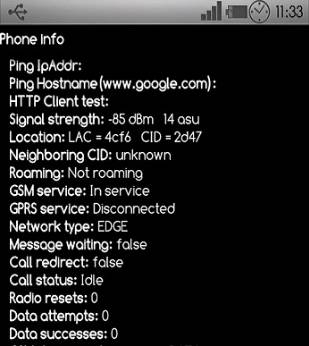
In my case I found that my handset always connects to the cell tower that has the best signal. The cell tower my device connects to sometimes change even when I put my mobile on the table, which may indicate the signal strength changed for whatever reasons.
2 Samsung, Motorola and Sony Ericsson Android devices
Enter *#*#4636#*#* and your phone will enter test mode.
3 ZTE Android devices
The code is different from above four cell phone makers. Enter *983*3640# and the test mode will appear.
There are many other Android device manufacturers out there, but their market share isn’t that high compared to Samsung, HTC and Motorola.
In addition to Android, we still have many other mobiles, and some of them have field test mode as well, such as Nokia, Palm phones. If your handset is not running Android, I have found a list of mobile models and codes, and you may want to check it out and find if your phone is listed.
P.S. Some cell tower apps display the CellID and LAC in hexadecimal (see above screenshot), and we can change them into decimal numbers. If you have any other issues, get in touch with me.
 410-6-319-59071
 262-2-7234-22752
 230-1-29500-14933
 505-1-36927-151823627
 510-11-35315-15356437